MiniTool Power Data Recovery
File recovery software
Backup software
Data recovery software
Phone data recovery software
- Features
- Ease of use
- Ease of management
- Quality of support
- Affordability
- Market presence
Take the quiz to check if MiniTool Power Data Recovery and its alternatives fit your requirements.

$69 per month
 Free Trial unavailable
 Free version

Small

Medium

Large

-
What is MiniTool Power Data Recovery
MiniTool Power Data Recovery is a data recovery application designed to scan storage media and recover deleted, lost, or inaccessible files. It targets individual users and small organizations that need ad hoc recovery from Windows PCs, external drives, memory cards, and other common storage devices. The product focuses on guided scan-and-restore workflows and file-type filtering/preview to help users identify recoverable items before restoring them. It is primarily a recovery tool rather than a centralized backup and recovery platform for managed environments.

Broad device and file support
The software supports recovery from common storage types such as internal HDD/SSD, external USB drives, and removable media like SD cards. It also handles typical loss scenarios including accidental deletion, formatting, and partition loss where the device is still detectable by the OS. File-type filtering and search help narrow results when scans return large volumes of data. This breadth fits one-off recovery needs without requiring a full backup stack.
Guided scanning and preview
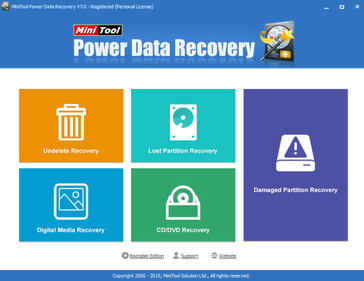
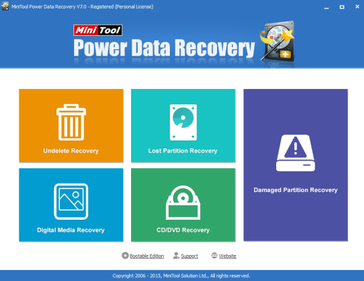
The workflow is oriented around selecting a location, running a scan, and reviewing results for recovery. Preview and file metadata views can help validate candidate files before writing recovered data to a safe destination. This reduces trial-and-error compared with tools that provide limited inspection of scan results. The UI approach is suited to non-specialist users performing occasional recovery tasks.
Works without prior backups
The product is designed for situations where no backup exists and recovery must rely on scanning the underlying storage. It can be used as a first-response tool after accidental deletion or formatting, provided the storage has not been heavily overwritten. This complements (but does not replace) backup products that require preconfigured jobs and repositories. It is useful for desktop support and small-office scenarios where centralized protection is not in place.

Not an enterprise backup platform
It does not provide centralized policy management, immutable repositories, or orchestrated recovery workflows typically required for enterprise data protection. There is no indication of features such as multi-tenant administration, role-based access controls for large teams, or broad workload coverage (e.g., virtualized and cloud-native environments) expected in platform offerings. Organizations needing compliance-oriented retention and audit controls generally require a dedicated backup and recovery suite. As a result, it fits best as an endpoint/drive recovery utility rather than a core protection system.
Recovery success is variable
Like all scan-based recovery tools, results depend on how much the storage has been overwritten since data loss and whether the device is physically healthy. Encrypted volumes, TRIM-enabled SSDs, and severe file system corruption can reduce recoverability. The software can identify candidates that ultimately cannot be restored intact. Users may need to stop using the affected drive and use separate storage for recovered files to maximize success.
Limited phone recovery positioning
Although it is sometimes associated with phone data recovery use cases, the product is primarily positioned around PC and removable storage recovery rather than comprehensive mobile device extraction. Mobile recovery often requires device-specific drivers, OS-level permissions, and support for app databases and encrypted backups, which are not core strengths of general disk recovery tools. Users seeking deep iOS/Android artifact recovery may find coverage limited. In practice, it is more reliable for recovering files from phone storage presented as removable media than for full logical/forensic-style phone recovery.
Plan & Pricing
| Plan | Price | Key features & notes |
|---|---|---|
| Free | Free | Recover up to 1 GB; limited features (cannot load previous scan results or use WinPE bootable builder); Free download available from MiniTool. |
| Personal (Monthly Subscription) | $69 per month | 1 license for 1 PC; unlimited data recovery; subscription auto-renews monthly; includes file previewer and WinPE bootable builder; listed as a monthly subscription on MiniTool site. |
| Personal (Annual Subscription) | $89 per year | 1 license for 1 PC; unlimited data recovery; subscription auto-renews annually; includes file previewer and WinPE bootable builder. |
| Personal Ultimate (Perpetual) | $99 (one-time/perpetual) | 1 license for 3 PCs; unlimited data recovery; lifetime free upgrades (page shows $99 and $129 price together in some places—$99 is shown as current perpetual price on product pages). |
| Business Standard (Perpetual) | $119 (one-time) | 1 license for 1 PC/Server; unlimited data recovery; includes Windows Server recovery support; 1 year free upgrade; email & phone support. |
| Business Deluxe (Perpetual) | $199 (one-time) | 1 license for 1 PC/Server; unlimited data recovery; Windows Server support; lifetime free upgrades; email & phone support. |
| Business Enterprise (Perpetual) | $399 (one-time) | 1 license for 99 PCs/Servers; unlimited data recovery; Windows Server support; 1 year free upgrade; includes WinPE bootable builder; email & phone support. |
| Business Technician (Perpetual) | $499 (one-time) | 1 license for 299 PCs/Servers; unlimited data recovery; Windows Server support; 1 year free upgrade; includes WinPE bootable builder; email & phone support. |
Notes: MiniTool also advertises a 30-day money-back guarantee. Prices and certain promotional/discounted values (e.g., $129 vs $99 shown in some pages) appear on the official site in different places (promotions/landing pages). All prices and feature checks above are taken directly from MiniTool's product pages and license comparison on minitool.com.
Seller details

MiniTool Software Ltd.

Vancouver, BC, Canada


Private

https://www.minitool.com/

https://x.com/minitool

https://www.linkedin.com/company/minitool-software-ltd/