AOMEI Backupper
Hard drive cloning software
Online backup software
PC backup software
Server backup software
Backup software
Data recovery software
- Features
- Ease of use
- Ease of management
- Quality of support
- Affordability
- Market presence
Take the quiz to check if AOMEI Backupper and its alternatives fit your requirements.

$29.95 per year
 Free TrialFree version

Small

Medium

Large

- Manufacturing
- Agriculture, fishing, and forestry
- Media and communications
What is AOMEI Backupper
AOMEI Backupper is a Windows backup and disk imaging tool used to protect PCs by creating system, disk, partition, and file backups and restoring them after data loss or system failure. It also includes disk cloning features for OS migration and drive replacement, plus bootable media creation for offline recovery. The product targets individual users and small-to-midsize organizations that need Windows-centric backup, restore, and cloning workflows without deploying a broader data protection platform.

Broad Windows backup modes
It supports system, disk, partition, and file/folder backups, which covers common PC protection scenarios. It also supports restore workflows that can be run from within Windows or via bootable media. This breadth makes it suitable for both routine file protection and full system recovery use cases.
Integrated disk cloning tools
It includes disk and partition cloning for drive replacement and OS migration scenarios. This reduces the need to use separate cloning utilities when moving from HDD to SSD or upgrading storage. Cloning and imaging in one product can simplify operational runbooks for small IT teams.
Bootable recovery media support
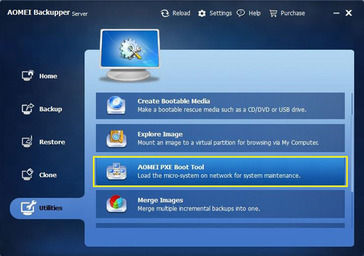
It can create bootable media to run backup/restore operations when Windows cannot start. This is useful for bare-metal recovery and for restoring images to a repaired or replaced drive. Offline recovery options are a practical requirement for many endpoint backup tools in this category.

Windows-first platform coverage
AOMEI Backupper primarily focuses on Windows endpoints and Windows-based recovery environments. Organizations needing consistent backup policies across macOS and Linux endpoints may require additional tools. This can increase operational complexity in mixed-OS environments.
Limited enterprise management depth
Compared with more enterprise-oriented backup suites, it typically offers less depth in centralized policy management, reporting, and multi-tenant administration. Larger environments may need stronger role-based controls, auditability, and fleet-wide visibility. Those requirements often push teams toward products designed for centralized administration at scale.
Not a full recovery platform
While it supports restore and cloning, it is not positioned as a comprehensive data recovery or incident response platform. Advanced recovery workflows (for example, extensive forensic recovery, immutable storage governance, or broad workload coverage) may require complementary solutions. Buyers should validate recovery objectives and supported scenarios against their RTO/RPO needs.
Plan & Pricing
| Plan | Price | Key features & notes |
|---|---|---|
| Standard (AOMEI Backupper Standard) | Free | Freeware edition (official site: "FREE" Standard). Basic backup/restore/sync and cloning (data-disk cloning only for Standard). Intended for personal use; free technical support per site. |
| Home (AOMEI Backupper Home / Home edition) | Yearly: $29.95; Lifetime: $49.95 | 1 PC / license. All backup, restore, sync & clone features for personal use. Options shown on official product page: Yearly, Lifetime. |
| Professional (AOMEI Backupper Professional) | From $39.95 (Yearly); Lifetime: $69.95 (examples shown on official pages) | 1 PC license (personal use). Advanced features vs Standard (faster task speed, additional features, VIP support). Official store lists Yearly, Yearly+1TB Cloud, Lifetime, Family Lifetime options. |
| Workstation | From $49.95 (Yearly); Lifetime example shown $79.95 | Business/PC use. 1 PC / license (team/multi‑PC options available). PXE Boot Tool and business features. Cloud 1TB addon optional (price shown separately). |
| Server (AOMEI Backupper Server) | From $149.00 (Yearly); Lifetime examples shown (e.g., $249.00) | For Windows Server. 1 Server / license (also multi‑server packages). Yearly, Yearly+1TB Cloud, Lifetime & SMB Lifetime variants shown on official pages. |
| Technician | From $499.00 (Yearly); Lifetime examples shown (e.g., $599–$799 depending on page) | For unlimited PCs within one company, allows billable technical services. Yearly, Yearly+1TB Cloud, Lifetime options on official store. |
| Technician Plus | From $699.00 (Yearly); Lifetime examples shown (e.g., $799–$999 depending on page) | Unlimited PCs & Servers within one company; image deployment, portable version, MSP features. Yearly, Yearly+1TB Cloud, Lifetime options on official store. |
Notes:
- Official site provides multiple license types and regional/promotional variations (Yearly subscription, Yearly+1TB Cloud addon, Lifetime one‑time license, Family/Team/SMB variants).
- The site also shows bundle/discounted prices and occasional promotional pricing; some news pages list alternative historical prices.
- Official store pages mention a 90‑day money‑back guarantee and instant license delivery.
Seller details

AOMEI Technology Co., Ltd.

Unsure


Private

https://www.aomeitech.com/

https://www.linkedin.com/company/aomei-technology/