
Find your right-fit generative AI, agents, apps.
Best easiest to use e-commerce software February 2026
Which best describes what you want to do?
Top picks by use case
Quick-launch online storefront
Target audience
First-time sellers and small business owners who need a complete store with minimal setup effort.
Overview
Built for sellers who need revenue flowing before the week is out. These platforms bundle hosting, payments, themes, and shipping into a single guided experience, eliminating every decision that would otherwise stall a non-technical founder before launch.
Fit & gap perspective
⏱️Instant setup
Store goes live with built-in payments, themes, and domain in under an hour.
🎨No-code design
Visual editor lets sellers customize layout, branding, and product pages without writing a single line of code.
Top picks

Our pick for: All-in-one store simplicity


€5 per month
 Free Trial
 Free version unavailable

Small

Medium

Large

- Arts, entertainment, and recreation
- Retail and wholesale
- Agriculture, fishing, and forestry
FitGaps's take


Pros and cons


Our pick for: Visual drag-and-drop design

$17.77 per month
Free TrialFree versionSmall
Medium
Large
- Retail and wholesale
- Accommodation and food services
- Agriculture, fishing, and forestry
FitGaps's take

Pros and cons
Our pick for: Retail-to-online bridge

$49 per location per month
Free TrialFree versionSmall
Medium
Large
- Accommodation and food services
- Arts, entertainment, and recreation
- Retail and wholesale
FitGaps's take

Pros and cons
Simple digital product seller
Target audience
Independent creators, educators, and software makers selling digital goods or subscriptions with no physical inventory.
Overview
Designed for creators who need a checkout, not a commerce platform. By stripping out inventory, shipping, and warehouse logic, these tools keep the path from upload to first sale as short as a single afternoon, with delivery and licensing handled automatically on every transaction.
Fit & gap perspective
📥Automatic digital delivery
Files, links, or license keys delivered instantly to the buyer after purchase without any manual seller action.
💳One-page checkout
Embeddable or hosted checkout that converts buyers without requiring a fully built storefront.
Top picks
Our pick for: Frictionless creator checkout

Pay-as-you-go
Free Trial unavailableFree versionSmall
Medium
Large
-
FitGaps's take

Pros and cons
Our pick for: Modern digital commerce with tax handling

Pay-as-you-go
Free Trial unavailableFree versionSmall
Medium
Large
- Education and training
- Information technology and software
- Professional services (engineering, legal, consulting, etc.)
FitGaps's take

Pros and cons
Our pick for: All-in-one creator storefront

$22 per month
Free TrialFree version unavailableSmall
Medium
Large
- Media and communications
- Arts, entertainment, and recreation
- Education and training
FitGaps's take

Pros and cons
Beginner dropshipping and print-on-demand
Target audience
New entrepreneurs starting a dropshipping or print-on-demand business without inventory or fulfillment infrastructure.
Overview
Purpose-built for sellers who want a real business without touching a single physical product. Supplier catalogs connect directly to the storefront, and every customer order routes to fulfillment automatically, keeping operational complexity near zero for first-time entrepreneurs.
Fit & gap perspective
📤One-click product import
Browse supplier catalogs and push products directly to your store without manual data entry or reformatting.
🤖Automated order routing
Customer orders forwarded to suppliers automatically for fulfillment with no manual intervention from the seller.
Top picks
Our pick for: Curated supplier marketplace

$24 per month
Free TrialFree versionSmall
Medium
Large
- Accommodation and food services
- Retail and wholesale
- Information technology and software
FitGaps's take

Pros and cons
Our pick for: Easy print-on-demand setup

$24.99 per month
Free Trial unavailableFree versionSmall
Medium
Large
- Retail and wholesale
- Arts, entertainment, and recreation
- Accommodation and food services
FitGaps's take

Pros and cons
Our pick for: End-to-end branded fulfillment

$24.99 per month
Free TrialFree versionSmall
Medium
Large
- Media and communications
- Retail and wholesale
- Accommodation and food services
FitGaps's take

Pros and cons
Lightweight add-to-site commerce
Target audience
Bloggers, WordPress site owners, and small businesses adding commerce to an existing web presence without a platform migration.
Overview
Engineered for businesses that already have a web presence and want to add selling capability without abandoning it. A widget, plugin, or JavaScript snippet layers transactional functionality onto any existing site, preserving years of SEO equity and content architecture intact.
Fit & gap perspective
🔌Embeddable checkout
Cart and payment flow added to any existing site via a widget, plugin, or lightweight code snippet.
🏠Existing site preservation
Commerce layer activates on top of the current CMS or website without requiring a platform migration or rebuild.
Top picks
Our pick for: Embed store anywhere

$5 per month
Free Trial unavailableFree versionSmall
Medium
Large
- Arts, entertainment, and recreation
- Retail and wholesale
- Manufacturing
FitGaps's take

Pros and cons
Our pick for: WordPress-native commerce

Completely free
Free Trial unavailableFree versionSmall
Medium
Large
- Retail and wholesale
- Arts, entertainment, and recreation
- Media and communications
FitGaps's take

Pros and cons
Our pick for: Developer-light cart overlay

Pay-as-you-go
Free Trial unavailableFree versionSmall
Medium
Large
- Media and communications
- Information technology and software
- Professional services (engineering, legal, consulting, etc.)
FitGaps's take

Pros and cons
Selection compass: how to prioritize requirements
What is selection compass?
FitGap scored 158 easy-to-use e-commerce products against a requirement framework informed by real buyer research — with specifications tracked across dozens of axes — to identify where vendor approaches diverge most within the simplicity constraint.
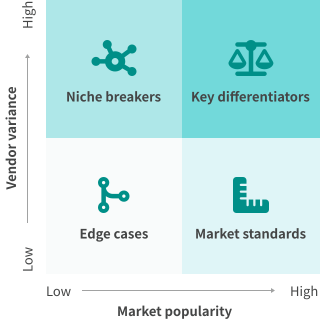
Key differentiators
🏗️Onboarding completeness and guided setup depth
Whether setup is a linear guided flow or a blank dashboard requiring self-directed configuration choices.
💸Transaction fee model and effective take rate
Platform fees on top of payment processing range from zero to 10%, creating large revenue variance at scale.
🌍Tax and compliance handling architecture
Whether sales tax and VAT are the seller's responsibility or absorbed structurally by a merchant-of-record model.
🔄Supplier and fulfillment integration depth
From manual CSV uploads to real-time automated order routing that requires zero seller intervention per transaction.
🧩Deployment model: hosted storefront vs. embeddable layer
Whether the tool replaces your web presence or adds commerce on top of an existing site without migration.
📦Product type breadth within a single account
Whether physical, digital, subscription, and print-on-demand products can coexist in one dashboard or require separate platforms.
Niche breakers
🖨️Native print-on-demand without third-party sync
Built-in POD fulfillment eliminates sync errors; external app bridges introduce order gaps that damage new stores.
🏪Point-of-sale inventory sync for retail sellers
Without real-time POS sync, online and in-store stock diverge, causing oversells that erode customer trust immediately.
📜Static site or headless CMS compatibility
Full e-commerce plugins break custom-stack architectures; only attribute-based or JavaScript overlay tools remain viable.
🔑License key and software delivery automation
Software sellers need native key generation; platforms without it force manual delivery, creating fulfillment bottlenecks.
Market standards
💳Integrated payment processing at activation
Payments must be available from day one inside the same interface, without a separate processor account setup.
📱Mobile-responsive storefronts by default
All themes and checkout flows must render correctly on mobile without additional configuration from the seller.
🔐SSL and PCI compliance handled by the platform
Security certification must be structural, not a seller responsibility requiring separate certificate management.
Edge cases
🌐Multi-currency display without a paid plan upgrade
Currency localization is gated at premium tiers on most platforms, relevant only when selling internationally from launch.
🧾EU VAT OSS compliance for digital goods
Mandatory for digital sellers crossing EU revenue thresholds; most platforms require a merchant-of-record model to handle it.
📵Offline or low-connectivity order management
Relevant only for market-stall or event sellers who need the same platform to process orders without internet access.
How to choose
1.Workflow design
Start from your selling situation, not a feature list. Define what you are selling (physical goods, digital files, custom merchandise, or subscriptions), where customers will find you (a new storefront, an existing website, or a shared link), and who handles operations (typically one person). For example, a photographer selling digital prints needs an upload-to-checkout flow, not inventory management. That single workflow decision eliminates most of the 158 products immediately.

Still looking for the perfect fit?
Whether you want our AI-powered engine to recommend the best match for your goals or prefer to browse our comprehensive directory, we have you covered.
Frequently asked questions
What makes an e-commerce platform genuinely easy to use?
Which type of easy-to-use e-commerce tool should I start with?
How quickly can I actually launch with the simplest platforms?
Do easy-to-use platforms charge transaction fees on top of payment processing?
Unpleasant truth: Can I actually scale a business on an easy-to-use platform?
What is a merchant of record and why does it matter for digital sellers?
Unpleasant truth: Are free plans on easy-to-use platforms actually usable for selling?
Is WooCommerce easy to use for someone without technical experience?
What is the difference between dropshipping tools and print-on-demand tools?
Unpleasant truth: What happens when a dropshipping supplier runs out of stock?
Can I add e-commerce to my existing WordPress site without rebuilding it?
How do easy-to-use platforms handle taxes for physical product sales?
What is the real cost difference between Shopify and a free storefront builder?
Can I sell both digital and physical products from the same easy-to-use platform?
Unpleasant truth: How often do easy-to-use platforms change their pricing mid-contract?


